Frequently Asked Questions
Updating your Microsoft antimalware and antispyware software
This page explains how updates work and where to get them.
If you don't already have Microsoft security software, or you want to reinstall it, see our software download page.
If you're using Windows XP, see our Windows XP end of support page.
For a list of the latest updates see the change log.
Windows will automatically download and install updates once a day for you.
If automatic updates aren't working there might be an issue with your PC:
If you want a more recent update (usually uploaded to this page within the last three hours), you canmanually download and install it.
Windows Update or:
In the table below, right-click on the link that will work for your version of Windows and choose Save target as... or Save link as... Save the file to your Desktop. When the file has finished downloading, go to your Desktop and double-click the file (it will be called mpam-fe.exe, mpas-fe.exe, or mpam-feX64.exe). Follow the prompts to install the update.
If you don't already have Microsoft security software, or you want to reinstall it, see our software download page.
If you're using Windows XP, see our Windows XP end of support page.
For a list of the latest updates see the change log.
Windows will automatically download and install updates once a day for you.
If automatic updates aren't working there might be an issue with your PC:
- Fix a problem with Microsoft Windows Update
- Reset Windows Update components
- Some malware can turn off Microsoft Update. See our advanced troubleshooting page for help.
If you want a more recent update (usually uploaded to this page within the last three hours), you canmanually download and install it.
Windows Update or: - Open your Microsoft security software.
- Click the Update tab.
- Click the Update button.
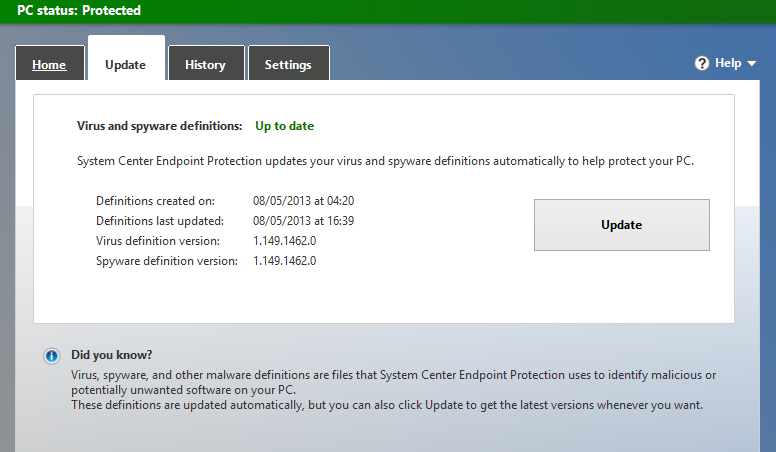
Because these updates change once a day, the definition version might be different to what is shown on this page, even after you've clicked the Update button.
Usually, updating once a day gives you a good level of protection, and it prevents us from constantly updating your software and interfering with how you use your PC.
Sometimes you might want to update more often. This can be helpful if you have hard-to-remove malware, Windows update isn't working properly, or you aren't always connected to the Internet.
Because these updates change once a day, the definition version might be different to what is shown on this page, even after you've clicked the Update button.
Usually, updating once a day gives you a good level of protection, and it prevents us from constantly updating your software and interfering with how you use your PC.
Sometimes you might want to update more often. This can be helpful if you have hard-to-remove malware, Windows update isn't working properly, or you aren't always connected to the Internet.
Check whether your version of Windows is 32-bit or 64-bit.
Last updated Tue, May 23 2017 3:16pm